
Download Zenith Connect – workers compensation claim, claim status, secure messaging, mobile access, insurance app, Android app, claim payments, issue date, worker communication, claim history
Overview
Zenith Connect is a mobile application developed by Zenith Insurance Company, designed to provide users with convenient, on-the-go access to their workers’ compensation claim information. The app serves as a digital gateway for individuals involved in workplace injury claims, enabling them to monitor key details such as payment status, estimated issue dates, and overall claim progress. By centralizing claim-related data, Zenith Connect simplifies the often complex process of tracking insurance claims, reducing the need for repeated phone calls or in-person visits.
Target users include injured workers, claims administrators, and other stakeholders involved in the workers’ compensation process. The app is particularly beneficial for individuals who require timely updates and direct communication channels with assigned personnel. Real-world use cases include checking claim status during recovery, verifying payment timelines, and initiating secure conversations with claims representatives when questions arise.
The application is available exclusively on the Google Play Store and is free to download and use. It supports Android 8.0 and above, ensuring broad compatibility with modern devices. Zenith Insurance Company has positioned the app as a user-friendly tool to enhance transparency and communication in the claims lifecycle.
Key Features & Capabilities
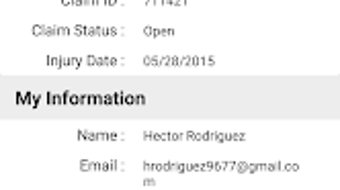
- Claim Status Tracking – Users can view the current status of their workers’ compensation claim, including historical updates and changes in status over time.
- Payment Information Access – The app provides visibility into claim payments, including amounts and estimated issue dates, allowing users to plan accordingly.
- Secure Messaging – A built-in messaging system enables users to communicate directly with assigned workers, ensuring privacy and compliance with data protection standards.
- Claim History Overview – Users can access a chronological record of claim developments, including key milestones and documentation.
- Multi-Language Support – The app supports languages beyond English, improving accessibility for non-English-speaking users.
- Feedback Submission – Users can send feedback directly through the app, contributing to continuous improvement of the service.
These features collectively support a more transparent and efficient claims experience. For example, an injured worker can check their claim’s status while recovering at home, verify when a payment is expected, and message their claims representative if clarification is needed—all from a single interface. The secure messaging feature ensures sensitive information is shared safely, while multi-language support broadens access across diverse user groups.
User Interface, Workflow & Performance
Zenith Connect features a clean, intuitive interface designed for ease of navigation on mobile devices. The layout prioritizes essential claim information, placing key metrics like status and payment details at the forefront. Navigation is straightforward, with clearly labeled sections for status, payments, messaging, and history.
Workflow efficiency is enhanced by minimizing the number of steps required to access critical data. Users can typically find their claim status within one or two taps from the home screen. The app’s performance is consistent with standard Android applications, though exact performance metrics such as CPU or RAM usage were not specified by the developer.
Stability appears to be a focus, as the app is designed for reliable access to sensitive information. The developer did not provide additional system requirements or performance benchmarks. However, based on general software behavior patterns, the app is expected to operate smoothly on devices meeting the minimum Android 8.0 requirement.
Compatibility & System Requirements
Zenith Connect is designed for Android devices and requires Android 8.0 or later to function. The app has a file size of 34.5 MB, which is relatively lightweight for a productivity tool with messaging and data access features.
Exact system requirements were not listed beyond the OS version. This includes no specified minimum RAM, CPU, or storage details. Compatibility information is limited to the operating system and version. Users should ensure their device meets the Android 8.0 requirement to install and use the application.
Pros and Cons
Pros
- Free to download and use with no hidden fees
- Provides real-time access to claim status and payment details
- Secure messaging ensures privacy in communications
- Supports multiple languages for broader accessibility
- Intuitive interface designed for mobile usability
- Direct feedback channel for user input
Cons
- Available only on Android, limiting cross-platform access
- No information on iOS or other operating system compatibility
- Exact performance and resource usage details not provided
- Functionality restricted to workers’ compensation claims within Zenith Insurance’s network
FAQ Section
Is Zenith Connect available for iOS devices?
As of now, the app is only available for Android. There is no official iOS version released or announced.
Is the app secure for sharing sensitive claim information?
Yes, the app includes secure text messaging features designed to protect user data during communication.
Can I use Zenith Connect offline?
The app requires an active internet connection to access claim data and send messages. Offline functionality is not supported.
How often are updates released?
Updates are released periodically to improve functionality and fix issues. The latest version is 3.1.1, released on March 15, 2024.
Is there a license fee or subscription required?
No, Zenith Connect is completely free to download and use. There are no subscription fees or in-app purchases.
Final Thoughts + CTA
Zenith Connect delivers a focused, user-centered solution for individuals managing workers’ compensation claims. Its core strengths lie in accessibility, secure communication, and real-time claim tracking—features that significantly reduce friction in an otherwise bureaucratic process. While the app is currently limited to Android devices, its free availability and robust feature set make it a valuable tool for injured workers and claims staff alike.
For those within the Zenith Insurance ecosystem who need reliable, mobile access to claim information, Zenith Connect offers a practical and secure experience. Its clean interface, multi-language support, and direct messaging capabilities enhance transparency and accountability.
Download Zenith Connect now





.png)

